
Chargebacks, fraud and notifications
Sometimes a customer goes to their bank instead of to you to get money back for a card payment. This guide explains what that means, how Periode tells you about it, and what to do.
Introduction
What is a chargeback?
A chargeback is when a customer asks their bank to take back a card payment they made to you. The bank does not ask you first. One chargeback, or a few, is nothing to worry about. Misunderstandings happen, and every business that takes card payments gets some. The bank opens a case, takes the money from your balance while the case is open, and gives you a deadline to respond.
Customers ask for a chargeback for many reasons. They may not recognize the charge on their statement, they may think they never got what they paid for, or they may have tried to cancel and been charged anyway. Some chargebacks are fair and some are not, and you get to say your side before the bank decides.
If you show that the customer bought and received what they paid for, you have a good chance of winning, and the money comes back to you. A win is never guaranteed, though. The customer’s bank makes the decision, and it can side with the customer even when you have done everything right. If you do not respond, or the bank sides with the customer, the money stays with the customer and you also pay a fee for the case.
What is a fraud alert?
A fraud alert is a warning from the customer’s bank that a card has been reported as stolen or misused, and that one of the payments made with it was to you. No money is taken and there is nothing to respond to. It is a heads-up that a chargeback may follow, and a chance to refund the payment on your own terms first.
What to do when you get a notification
Periode shows chargebacks and fraud alerts as notifications in the Backoffice. When one appears:
- Open the notification and look at who paid and what they paid for.
- Contact the customer if you can. Many cases are solved by explaining what the charge was for.
- Follow the steps for that type of notification further down in this guide. For a chargeback, respond before the deadline.
Chargebacks and fraud alerts are handled through Adyen, the card processor behind Periode, so this guide only covers card payments. Refunds you start yourself are covered in Payments and refunds.
Notifications in the Backoffice
Where to find them
Notifications live under Home > Notifications. A red dot on Home in the menu, and on the Notifications tab, means there is at least one unread notification.
Only admins see the Home page, so booking masters and restricted admins do not receive these notifications. Make sure at least one admin checks the tab regularly, because chargebacks have a response deadline. See Admin users for roles.
What a notification looks like
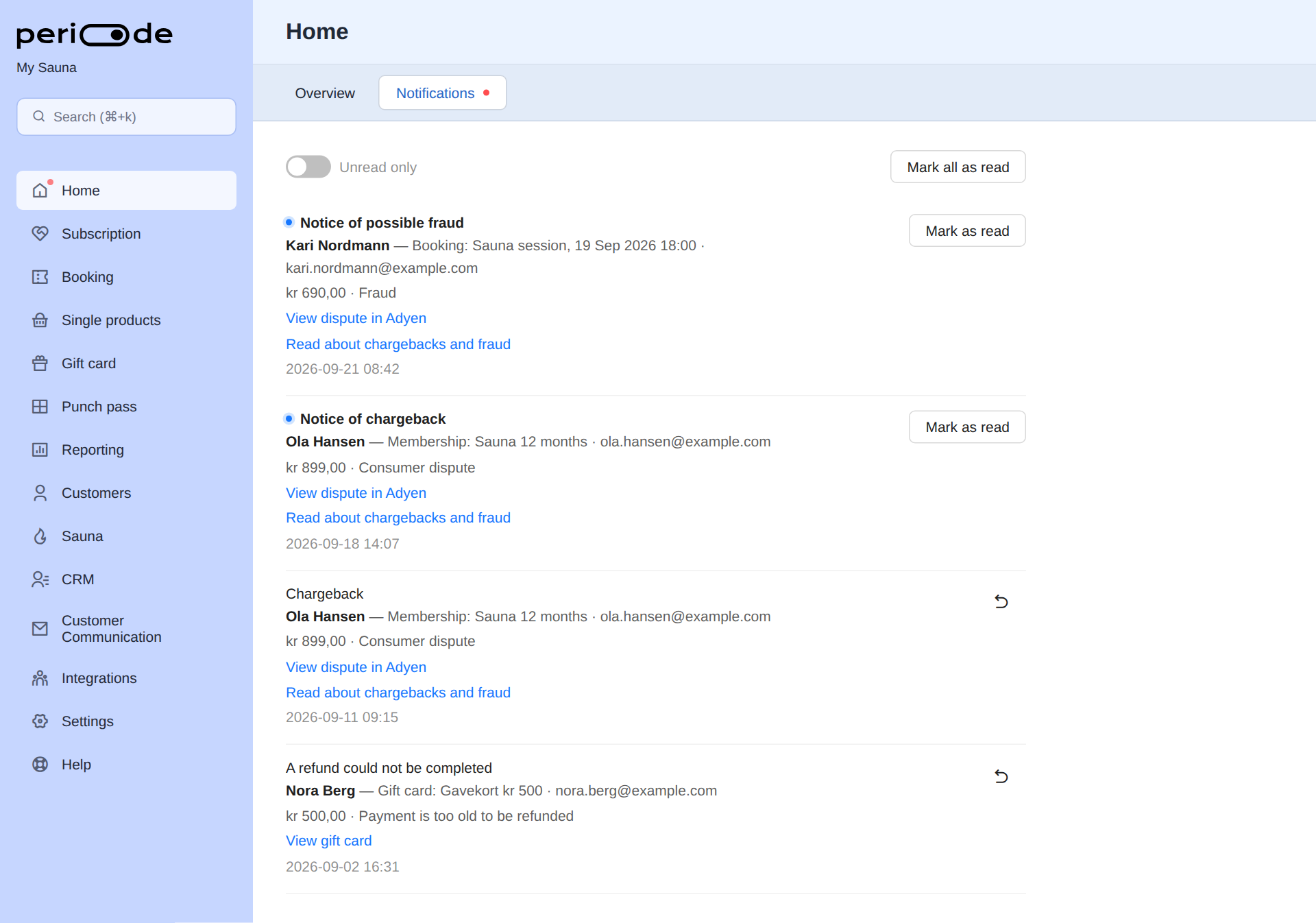
Each notification shows:
- A title that says what happened: Notice of possible fraud, Notice of chargeback or Chargeback. The same tab also shows refunds that could not be completed.
- Who and what: the customer’s name, what they paid for (a booking, membership, gift card, punch pass or single payment) and their email.
- The disputed amount and the reason the bank gave, for example Fraud or Consumer dispute.
- Links: View dispute in Adyen opens the disputes list on the Adyen tab, scrolled to the right place, and Read about chargebacks and fraud opens this guide.
- When the notification was created.
Use Mark as read once someone has taken responsibility for the case, and Mark all as read to clear the list. Switch on Unread only to see only what still needs attention. A read notification can be marked unread again from the undo button on the row.
What to do when you get a notification
Notice of possible fraud
- Contact the customer. Many disputes come from an unrecognized charge. Open the booking, membership or purchase from the notification and check whether it looks like a real customer: a matching name and email, earlier bookings, a completed check-in or a signed waiver.
- If the purchase looks fraudulent, refund it and cancel the booking or stop the membership. See Refunds, Cancel one booking and Stopping a subscription. A refund made now usually avoids a later chargeback and the fee that comes with it. A chargeback fee varies, but is often a 15-50 euro equivalent amount, and it is charged whether you win or lose. Keep this in mind when deciding how you want to handle it.
- If it looks like a real customer, there is nothing to do. Mark the notification as read and keep an eye out for a chargeback on the same payment.
Do not try to defend a fraud alert. There is nothing to respond to at this stage.
Notice of chargeback
- Contact the customer. Many disputes come from an unrecognized charge, and a short conversation can end the dispute before it costs anything.
- Start collecting evidence from Periode while the details are fresh. See Evidence you can find in Periode.
- Do not refund separately. Once a dispute is open, the bank handles the money, and a refund from Periode on top can mean the customer is paid back twice. If you want to refund, accept the chargeback once it arrives.
Chargeback
- Open the dispute from the notification and note the deadline shown in the status. If you do nothing before it, the chargeback is lost automatically.
- Decide whether to defend or accept.
- Defend when the customer got the service, was at the session, or agreed to the terms, and you can show it.
- Accept when the customer has a fair claim, for example a session that was cancelled without a refund, or when the amount is too small to be worth the work. Accepting is how you refund a disputed payment. Do not refund it separately in Periode.
- If you defend, upload the evidence in the Adyen dispute view before the deadline and wait for the decision. The status changes to Pending while the bank reviews it, then Won or Lost.
- If the chargeback is lost or accepted, cancel the booking or stop the membership so the customer does not keep the service without paying for it.
Evidence you can find in Periode
The bank wants to see that the customer knowingly bought something and received it. In Periode you can usually find:
- The booking or subscription itself: what was bought, the price, the date and time, and when it was created.
- The customer’s page: their name, email and phone, earlier purchases, and whether the same person has bought from you before.
- The confirmation email and receipt Periode sent, which show the terms the customer accepted.
- Check-in on the session, which shows the customer attended. See Check-in.
- A signed waiver, where your booking product uses one.
- Messages sent to the customer, and the subscription’s activity log.
Export or screenshot what applies, and describe in a few sentences what the customer bought and how they used it. See Adyen’s documentation, linked below, for how the process runs.
The three dispute notifications
A dispute goes through stages, and Periode creates one notification per stage it is told about. Not every dispute goes through every stage.
-
Fraud alert
Periode notification: Notice of possible fraud
What it means
- The cardholder's bank has reported the card as used fraudulently.
- Information only. There is nothing to defend yet.
What to do
- Contact the customer. Many disputes come from an unrecognized charge.
- If it looks fraudulent, refund it and cancel the booking or membership.
No money withheld
-
Notice of chargeback
Periode notification: Notice of chargeback
What it means
- The bank has opened a dispute and a chargeback is on its way.
What to do
- Contact the customer. Many disputes come from an unrecognized charge.
- Start collecting your evidence now.
No money withheld yet
-
Chargeback
Periode notification: Chargeback
What it means
- The disputed amount is withheld from your balance.
- A deadline to respond is shown in the Adyen Disputes list.
What to do
- Open the dispute in Adyen and either Defend with documents or Accept.
- Do not refund separately. If you want to refund, accept the chargeback.
Amount withheld, deadline to respond
-
Outcome
Status in the Adyen Disputes list
Won
- The amount is returned to your balance.
Lost, accepted or expired
- The amount stays with the customer's bank.
- Cancel the booking or membership so the customer does not keep the service unpaid.
| Notification | What it means | Money |
|---|---|---|
| Notice of possible fraud | The cardholder’s bank has reported the card as used fraudulently. This is information only. It may or may not become a chargeback. | Nothing is withheld. |
| Notice of chargeback | The bank has opened a dispute and a chargeback is on its way. | Nothing is withheld yet. |
| Chargeback | The chargeback has been raised. You can now defend it or accept it in Adyen, before the deadline shown there. | The disputed amount is withheld from your balance while it is open. |
If you win a chargeback, the amount is returned to your balance. If you lose it, accept it, or let the deadline pass, the amount stays with the customer’s bank.
The Adyen disputes list
Where to find it
The disputes list is the last section under Reporting > Adyen, which is also where the View dispute in Adyen link in a notification takes you. The Adyen tab is only shown when your account takes card payments through Adyen.
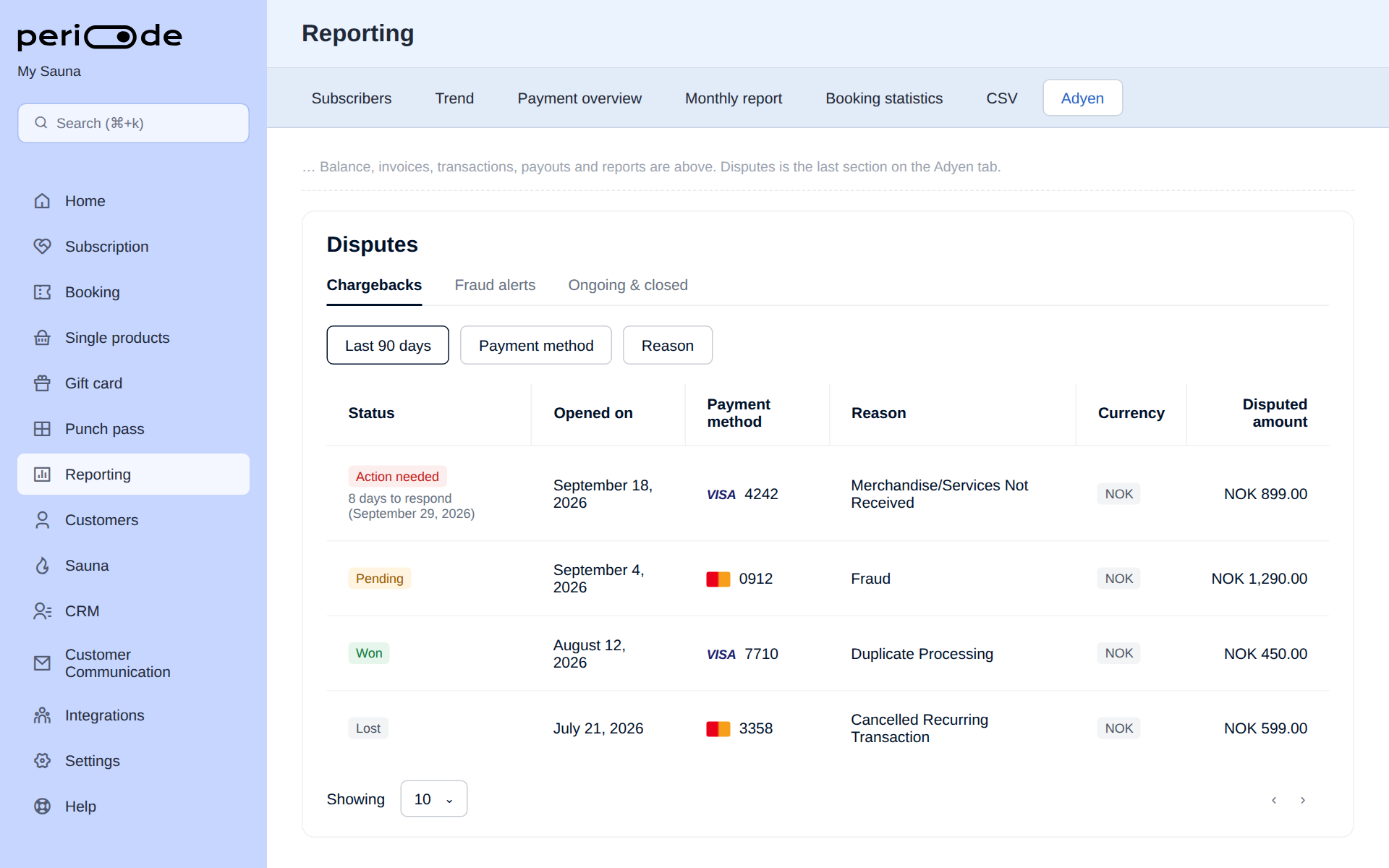
The list shows the last 90 days by default. Use the date filter to look further back.
What you can do there
The list has three views:
- Chargebacks: open chargebacks that you can still act on. The status shows how many days you have left to respond.
- Fraud alerts: notices of possible fraud. These are for information and cannot be defended.
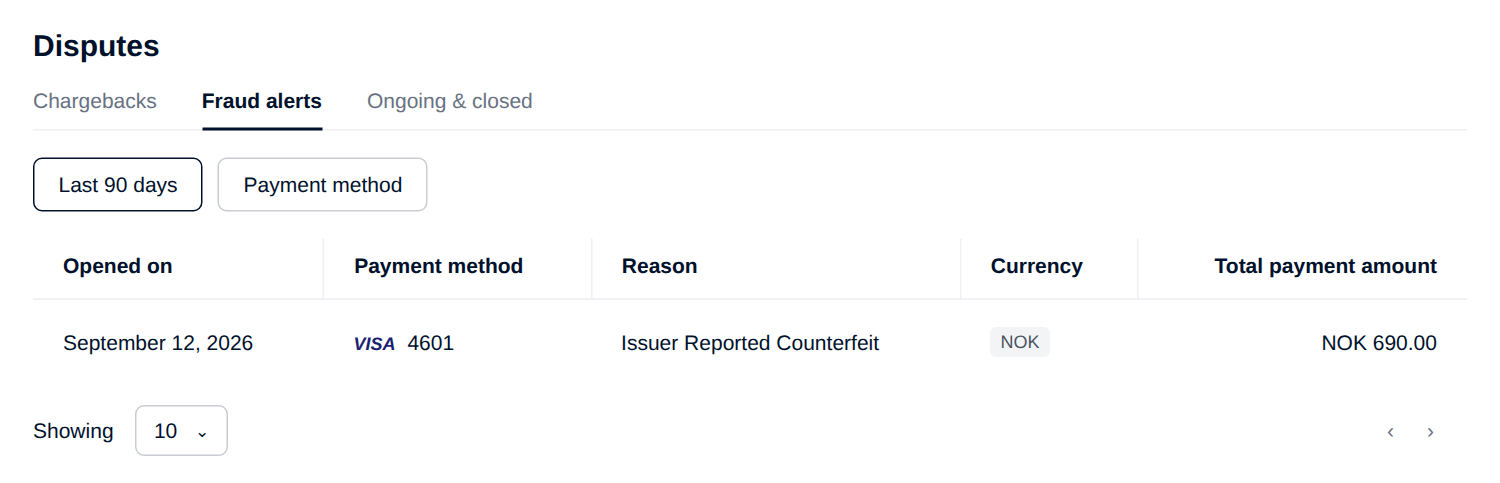
Open a row to see the full details of the dispute, and from there:
- Defend the chargeback by uploading documents that show the customer got what they paid for and agreed to the charge.
- Accept the chargeback if you agree the customer should have the money back. Once accepted, the amount is not returned to you.
Reduce the risk of disputes
- Use a clear company name and contact email under
Settings > Company, so the charge is recognizable on the customer’s statement and they can reach you before calling their bank. - Keep refund rules and the cancellation deadline visible on your products, and honour them. Most consumer disputes start with a refund the customer felt they were owed.
- For memberships, make it easy for the customer to stop the subscription themselves. Charges after a customer thought they had cancelled are a common chargeback reason.
- Act on fraud alerts quickly. A refund on a fraudulent card payment is cheaper than a chargeback.
Adyen documentation
Adyen’s own documentation goes deeper on the stages, deadlines and what happens to the money at each step. See Dispute process and flow.